
| 일 | 월 | 화 | 수 | 목 | 금 | 토 |
|---|---|---|---|---|---|---|
| 1 | 2 | 3 | 4 | 5 | 6 | 7 |
| 8 | 9 | 10 | 11 | 12 | 13 | 14 |
| 15 | 16 | 17 | 18 | 19 | 20 | 21 |
| 22 | 23 | 24 | 25 | 26 | 27 | 28 |
Tags
- unity
- gameplay tag
- animation
- gameplay ability system
- 언리얼 엔진
- 유니티
- Aegis
- stride
- C++
- attribute
- 게임개발
- linear regression
- CTF
- 보안
- gameplay effect
- rpc
- photon fusion2
- widget
- Multiplay
- Unreal Engine
- local prediction
- Replication
- UI
- gas
- ability task
- os
- 언리얼엔진
- MAC
- 게임 개발
- listen server
Archives
- Today
- Total
Replicated
[Fortress Craft] Target Setting / Attack Enabled 본문

우측의 버튼을 누르면 자신에게 할당된 유닛들의 타겟과 공격 가능 설정을 가능
RPC로 권한을 가진 메인 클라이언트가 값을 변경하도록 함
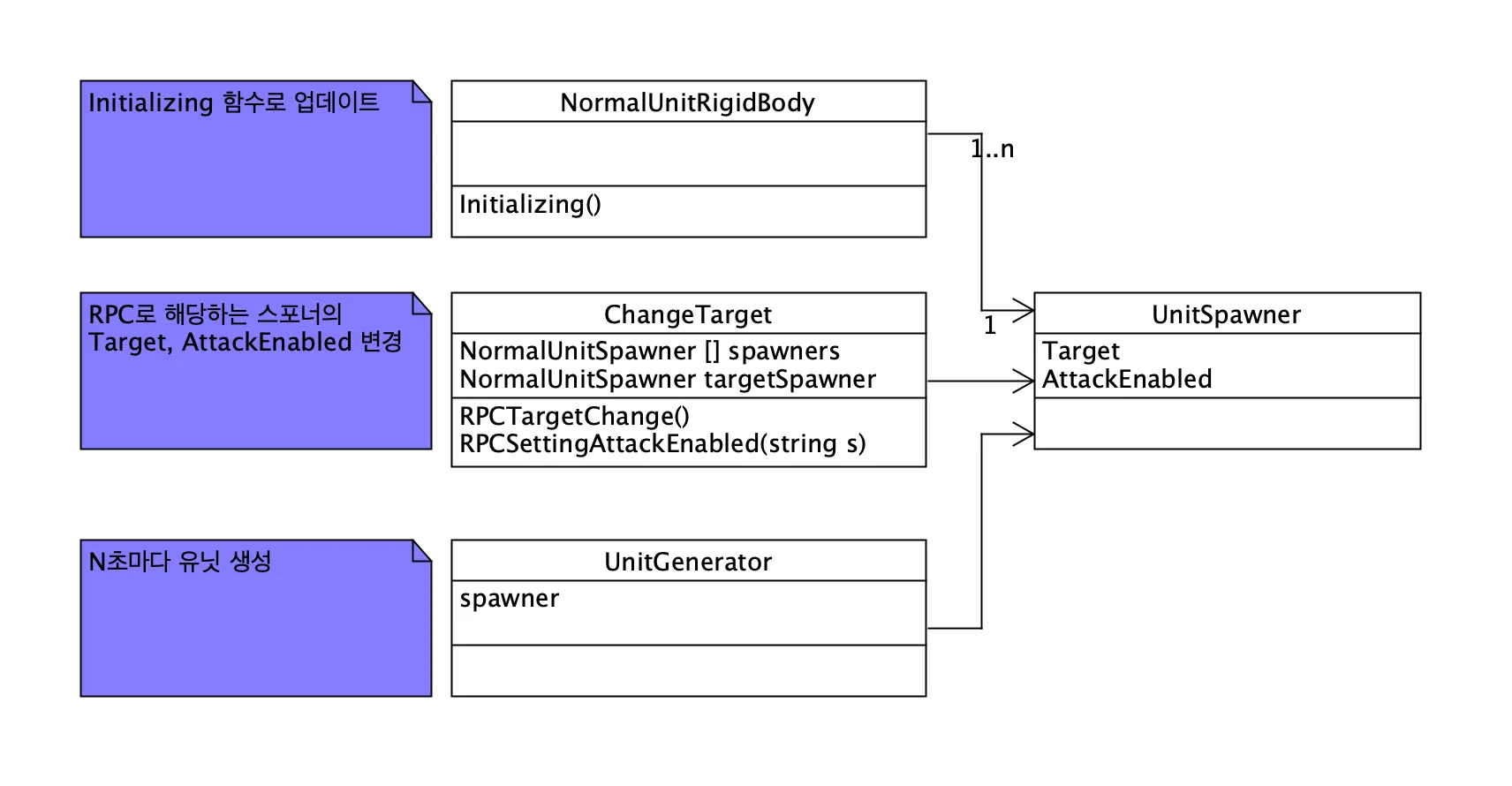
이런 구조
이게 좀 문제가 있는 구조인데, Target을 싱글톤 패턴으로 매니저 만들어서 그쪽에서 관리를 하게 했어야 한다
원래는 Spawner가 플레이어 당 하나만 존재하는 기획이라 이렇게 짜놨는데, 스포너가 여러개가 되면서 코드의 품질이 떨어졌다
using Fusion;
using UnityEngine;
using UnityEngine.UI;
using FusionHelpers;

namespace Agit.FortressCraft
{
    public class ChangeTarget : NetworkBehaviour
    {
        private NormalUnitSpawner[] spawners;
        private Button[] btns;
        private Button attackBtn;
        private Color orgColor;
        private Color unselectedColor;
        public bool IsAttackOn { get; set; }

        public string OwnType { get; set; }
        public string Target { get; set; }

        private string buttonNameA = "Button_1";
        private string buttonNameB = "Button_2";
        private string buttonNameC = "Button_3";
        private string buttonNameD = "Button_4";
        private string buttonNameAttack = "Button_Attack";

        private void Awake()
        {
            IsAttackOn = true;
            Target = null;
            OwnType = "";
            btns = GetComponentsInChildren<Button>();
            Debug.Log("Change Target Start");
            foreach (Button btn in btns)
            {
                if (btn.transform.name == buttonNameA)
                {
                    btn.onClick.AddListener(SetTargetA);
                }
                else if (btn.transform.name == buttonNameB)
                {
                    btn.onClick.AddListener(SetTargetB);
                }
                else if (btn.transform.name == buttonNameC)
                {
                    btn.onClick.AddListener(SetTargetC);
                }
                else if (btn.transform.name == buttonNameD)
                {
                    btn.onClick.AddListener(SetTargetD);
                }
                else if (btn.transform.name == buttonNameAttack)
                {
                    attackBtn = btn;
                    btn.onClick.AddListener(SetAttack);
                }
            }

            orgColor = btns[0].GetComponent<Image>().color;
            unselectedColor = new Color(0.2f, 0.2f, 0.2f, 0.2f);
        }

        // 골라진 타겟만 색을 바꾸도록 설정
        public void UpdateTargetButtonColor(string name)
        {
            foreach( Button btn in btns )
            {
                if (btn.transform.name == buttonNameAttack) continue;

                if (btn.transform.name == name)
                {
                    btn.GetComponent<Image>().color = orgColor;
                }
                else
                {
                    btn.GetComponent<Image>().color = unselectedColor;
                }
            }
        }

        private void UpdateAttackButtonColor()
        {
            if ( IsAttackOn )
            {
                attackBtn.GetComponent<Image>().color = unselectedColor;
            }
            else
            {
                attackBtn.GetComponent<Image>().color = orgColor;
            }

            IsAttackOn = !IsAttackOn;
        }

        public void SetTargetA()
        {
            Debug.Log("Owntype: " + OwnType);
            spawners = GameObject.FindObjectsOfType<NormalUnitSpawner>();
            Target = "A";

            foreach (NormalUnitSpawner spawner in spawners)
            {
                if (spawner.SpawnerType.CompareTo(OwnType) != 0) continue;
                Debug.Log("Spawner: " + spawner.SpawnerType + " . " + OwnType);
                Debug.Log("Set as A");
                spawner.RPCTargetChange("A");
                UpdateTargetButtonColor(buttonNameA);
            }
        }

        public void SetTargetB()
        {
            Debug.Log("Owntype: " + OwnType);
            spawners = GameObject.FindObjectsOfType<NormalUnitSpawner>();
            Target = "B";

            foreach (NormalUnitSpawner spawner in spawners)
            {
                if (spawner.SpawnerType.CompareTo(OwnType) != 0) continue;
                Debug.Log("Spawner: " + spawner.SpawnerType + " . " + OwnType);
                Debug.Log("Set as B");
                spawner.RPCTargetChange("B");
                UpdateTargetButtonColor(buttonNameB);
            }
        }

        public void SetTargetC()
        {
            Debug.Log("Owntype: " + OwnType);
            spawners = GameObject.FindObjectsOfType<NormalUnitSpawner>();
            Target = "C";

            foreach (NormalUnitSpawner spawner in spawners)
            {
                if (spawner.SpawnerType.CompareTo(OwnType) != 0) continue;
                Debug.Log("Spawner: " + spawner.SpawnerType + " . " + OwnType);
                Debug.Log("Set as C");
                spawner.RPCTargetChange("C");
                UpdateTargetButtonColor(buttonNameC);
            }
        }

        public void SetTargetD()
        {
            Debug.Log("Owntype: " + OwnType);
            spawners = GameObject.FindObjectsOfType<NormalUnitSpawner>();
            Target = "D";

            foreach( NormalUnitSpawner spawner in spawners )
            {
                if (spawner.SpawnerType.CompareTo(OwnType) != 0) continue;
                Debug.Log("Spawner: " + spawner.SpawnerType + " . " + OwnType);
                Debug.Log("Set as D");
                spawner.RPCTargetChange("D");
                UpdateTargetButtonColor(buttonNameD);
            }
        }

        public void SetAttack()
        {
            spawners = GameObject.FindObjectsOfType<NormalUnitSpawner>();

            foreach (NormalUnitSpawner spawner in spawners)
            {
                if (spawner.SpawnerType.CompareTo(OwnType) != 0) continue;
                Debug.Log("Attack Setting Changed");
                spawner.RPCChangeAttackEnabled();
                UpdateAttackButtonColor();
            }
        }
    }
}
버튼이고, Spawner에 있는 RPCTargetChange를 통해 스포너에 있는 타겟이다
AttackEnabled도 마찬가지로 스포너에서 관리한다
싱글톤으로 빼서 관리하는게 훨씬 SOLID에 적합한 구조이다
이때 구조를 잘못 짜놔서 나중에 고생했다
'유니티 엔진 > Fortress Craft' 카테고리의 다른 글
| [Fortress Craft] Castle 생성 UI, 가격 설정 (0) | 2025.02.05 |
|---|---|
| [Fortress Craft] ** Network Object Pooling (Photon Fusion2, Shared Mode) ** (0) | 2025.02.05 |
| [Fortess Craft] Path Finding (0) | 2025.02.05 |
| [Fortress Craft] Damage System (0) | 2025.02.05 |
| [Fortress Craft] Animation - Damaged (Flash White) (0) | 2025.02.05 |
'유니티 엔진/Fortress Craft' Related Articles
more


