| 일 | 월 | 화 | 수 | 목 | 금 | 토 |
|---|---|---|---|---|---|---|
| 1 | ||||||
| 2 | 3 | 4 | 5 | 6 | 7 | 8 |
| 9 | 10 | 11 | 12 | 13 | 14 | 15 |
| 16 | 17 | 18 | 19 | 20 | 21 | 22 |
| 23 | 24 | 25 | 26 | 27 | 28 | 29 |
| 30 | 31 |
Tags
- 게임개발
- gameplay effect
- local prediction
- stride
- 보안
- UI
- widget
- Unreal Engine
- C++
- 게임 개발
- gameplay tag
- MAC
- gas
- Multiplay
- unity
- attribute
- 유니티
- gameplay ability system
- 언리얼 엔진
- rpc
- Aegis
- linear regression
- photon fusion2
- animation
- ability task
- 언리얼엔진
- listen server
- os
- CTF
- Replication
Archives
- Today
- Total
Replicated
RasterizerState, SampleState, BlendState 본문
1. RasterizerState
void Game::CreateRasterizerState()
{
	D3D11_RASTERIZER_DESC desc;
	ZeroMemory(&desc, sizeof(desc));
	desc.FillMode = D3D11_FILL_SOLID;
	desc.CullMode = D3D11_CULL_BACK;
	desc.FrontCounterClockwise = false;

	HRESULT hr = _device->CreateRasterizerState(&desc, _rasterizerState.GetAddressOf());
	CHECK(hr);
}
이래놓고 키면 별 차이 없음
D3D11_FILL_WIREFRAME이걸로 하면
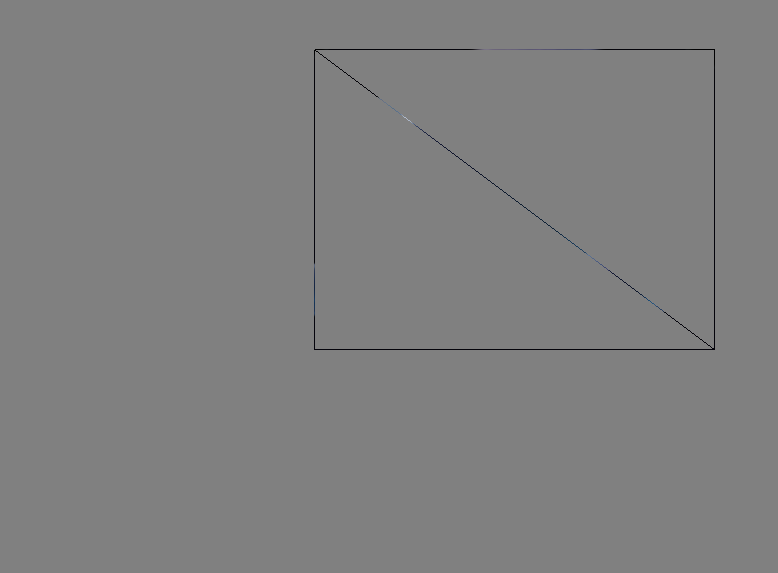
안을 안채움
CullMode는 안보이는 거 잘라내는 건데
BACK은 후면이면 잘라낸다는 거
D3D11_CULL_FRONT
전면을 잘라내니 당연히 안보임
앞 뒤 판별은 어떻게 되느냐
FrontCounterClockwise카운터클록와이즈, 반시계
앞방향이 반시계 방향이다 라는 설정이 false
삼각형을 만들 때, 정점 설정을 시계 방향으로 했음. 그래서 이게 앞면이 됨
2. SampleState
Texture2D texture0 : register(t0);
SamplerState sampler0 : register(s0);

float4 PS(VS_OUTPUT input) : SV_Target
{
    float4 color = texture0.Sample(sampler0, input.uv);
    return color;
}
여기서 썼던 건데
uv 좌표 따라서 샘플링 해주는 거와 관련
샘플링 규칙
void Game::CreateSamplerState()
{
	D3D11_SAMPLER_DESC desc;
	ZeroMemory(&desc, sizeof(desc));
	desc.AddressU = D3D11_TEXTURE_ADDRESS_BORDER;
	desc.AddressV = D3D11_TEXTURE_ADDRESS_BORDER;
	desc.AddressW = D3D11_TEXTURE_ADDRESS_BORDER;
	desc.BorderColor[0] = 1;
	desc.BorderColor[1] = 0;
	desc.BorderColor[2] = 0;
	desc.BorderColor[3] = 1;
	desc.ComparisonFunc = D3D11_COMPARISON_ALWAYS;
	desc.Filter = D3D11_FILTER_MIN_MAG_MIP_LINEAR;
	desc.MaxAnisotropy = 15;
	desc.MaxLOD = FLT_MAX;
	desc.MinLOD = FLT_MIN;
	desc.MipLODBias = 0.0f;

	_device->CreateSamplerState(&desc, _samplerState.GetAddressOf());
}
근데 이래도 잘 안보이니까
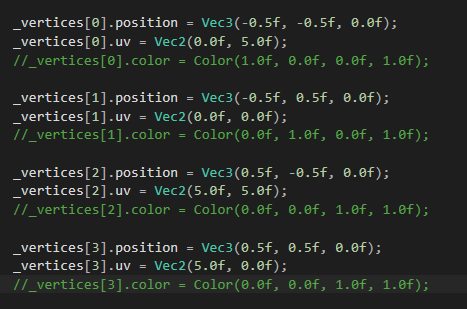
버텍스 UV 수정 좀 해주면

이런식으로 되는데
D3D11_TEXTURE_ADDRESS_BORDER이거 때문
desc.AddressU = D3D11_TEXTURE_ADDRESS_MIRROR;
desc.AddressV = D3D11_TEXTURE_ADDRESS_BORDER;
desc.AddressW = D3D11_TEXTURE_ADDRESS_BORDER;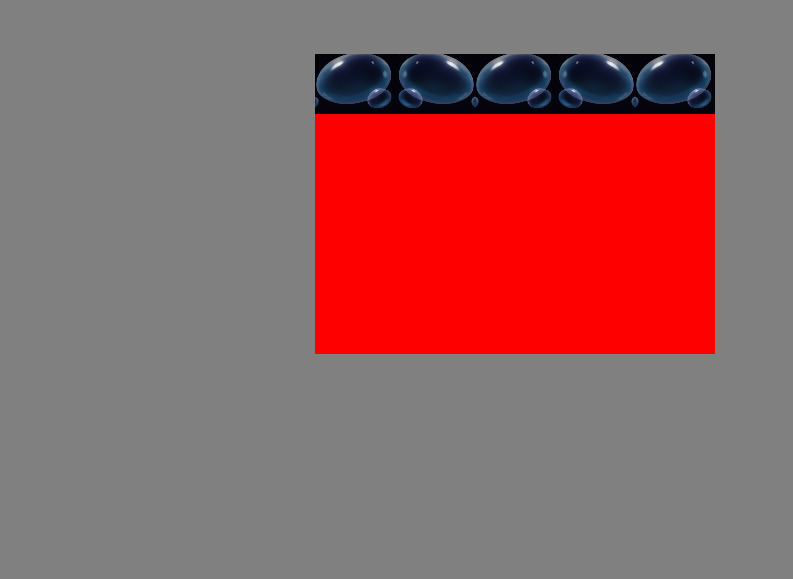
U만 미러하면 이런식
이런식으로 샘플링에 관련된 것들 세팅 가능
3. BlendState
void Game::CreateBlendState()
{
	D3D11_BLEND_DESC desc;
	ZeroMemory(&desc, sizeof(desc));
	desc.AlphaToCoverageEnable = false;
	desc.IndependentBlendEnable = false;

	desc.RenderTarget[0].BlendEnable = true;
	desc.RenderTarget[0].SrcBlend = D3D11_BLEND_SRC_ALPHA;
	desc.RenderTarget[0].DestBlend = D3D11_BLEND_INV_DEST_ALPHA;
	desc.RenderTarget[0].BlendOp = D3D11_BLEND_OP_ADD;
	desc.RenderTarget[0].SrcBlendAlpha = D3D11_BLEND_ONE;
	desc.RenderTarget[0].DestBlendAlpha = D3D11_BLEND_ZERO;
	desc.RenderTarget[0].BlendOpAlpha = D3D11_BLEND_OP_ADD;
	desc.RenderTarget[0].RenderTargetWriteMask = D3D11_COLOR_WRITE_ENABLE_ALL;

	HRESULT hr = _device->CreateBlendState(&desc, _blendState.GetAddressOf());
	CHECK(hr);
}
그냥 블렌드 설정
'DirectX 11' 카테고리의 다른 글
| Constant Buffer (0) | 2026.08.01 |
|---|---|
| 텍스처, UV (0) | 2026.08.01 |
| 삼각형 띄우기 (0) | 2026.08.01 |
| 장치 초기화 (0) | 2026.08.01 |
| Windows API로 진입점 만들기 (0) | 2025.04.07 |